How can we help?
Search our Help Center or browse a category below. Finding an answer should be as easy as finding your stuff.
What do you need help with?
Choose a category or use the search above to find your answer.
Frequently Asked Questions
Browse all Easy Stuff Finder help topics.
Easy Stuff Finder is an organization and inventory application designed to help you know what you have, where it is, and when you need it. It combines inventory, locations, search, QR codes, preparation tools, shopping, maintenance, pets, emergency tools and more in one easy-to-use system.
Getting StartedStart by creating your first Place, such as your home, apartment or office. From there you can add Locations, Storage Areas, Sections, Containers and Items. You don't have to organize everything in one day. Start with one area and build your inventory at your own pace.
Getting StartedNo. Easy Stuff Finder is useful from the moment you begin. You can start with one closet, garage, storage room or group of important items and continue adding more whenever you want.
Getting StartedYes. Easy Stuff Finder supports multiple Places depending on your plan. A Place can represent a home, apartment, office, warehouse or another physical space you want to organize.
Getting StartedThink of them as levels that describe where something is. A Place could be your home, a Location could be the garage, a Storage Area could be a shelving unit, a Section could be one shelf, and a Container could be a box on that shelf. You can use the levels that make sense for your real space.
InventoryNo. Real life doesn't always fit inside boxes. Items can be organized according to the structure that makes sense for their actual location. Containers are available when you need them, but they are not required for every item.
InventoryYes. When you reorganize something in real life, update its location in Easy Stuff Finder so the app continues to reflect where the item actually is.
InventoryYes. Easy Stuff Finder is designed to track real inventory, including quantities, so you can know not only where a product is but how much of it you have available.
InventoryYes. Photos make your inventory easier to recognize and manage. The number of stored photos available depends on your plan.
InventoryYes. Paid plans increase inventory capacity, and Advance, Family / Co-Work and Corporate provide unlimited core inventory capacity for Locations, Storage Areas, Sections, Containers and Items, subject to the limits of each plan.
InventoryUse Search and enter information related to the item you're looking for. Easy Stuff Finder displays matching results so you can quickly identify and navigate to the item you need.
Search & QRQR codes connect physical storage with your digital inventory. For example, you can place a QR label on a Container and scan it to quickly access information about that Container and the items associated with it.
Search & QRThat's one of the main advantages of using QR-enabled Containers. Scan the Container and check its inventory in Easy Stuff Finder before physically opening the box.
Search & QRYes. Search is designed to help you locate information throughout your available inventory instead of requiring you to manually browse through every storage level.
Search & QRPreparation turns your inventory into something you can actively use. Depending on your plan, Easy Stuff Finder can help you prepare for Travel, Camping, Important Documents, Shopping, seasonal events and other real-life situations.
PreparationYou can select items from your actual inventory for a trip and keep track of what you're taking. When you return, Easy Stuff Finder helps you work through the return process so those items can become available in your inventory again.
PreparationYes, on plans that include Camping Preparation. You can work with the camping items that are actually available in your inventory and manage their preparation and return.
PreparationShopping connects what you need to purchase with your inventory. Easy Stuff Finder can create and manage shopping needs and guide you through the process while you're at the store, depending on the features available in your plan.
PreparationIt helps you prepare and keep track of important documents you may need for a particular situation, using the same preparation logic that keeps the process organized and easy to follow.
PreparationSeasonal workflows help you organize recurring events such as Halloween, Winter, Thanksgiving, Christmas, New Year's Eve and Valentine's Day. Availability depends on your plan.
PreparationMaintenance helps you manage recurring checks and responsibilities related to the things you own. Easy Stuff Finder includes multiple Maintenance categories, with the number available depending on your plan.
MaintenanceYes. Rechargeable items are one of the types of things that can benefit from recurring checks so you don't discover a dead battery only when you need the item.
MaintenanceEasy Stuff Finder includes tools for managing recurring and time-sensitive information associated with your belongings. The exact Maintenance categories available depend on your plan.
MaintenanceThe Free plan lets you choose 1 Maintenance category, Basic lets you choose 5, Advance includes the first 10, and Family / Co-Work and Corporate include all 11 categories.
MaintenanceYes. Easy Stuff Finder includes Pet tools so information related to the animals in your household can be part of your overall organization system.
Pets & EmergencyBasic supports 1 Pet, Advance supports 3 Pets, and Family / Co-Work and Corporate support unlimited Pets. The Free plan provides limited preview access to Pet features.
Pets & EmergencyEmergency tools help you identify and prepare the items you may need when an emergency is active. Easy Stuff Finder makes active emergency information highly visible so it is difficult to overlook when you're working elsewhere in the app.
Pets & EmergencyYes, with plans that include Inventory Sharing. Family / Co-Work allows the Owner plus up to 5 invited members, while Corporate allows the Owner plus up to 20 invited members.
SharingYes. Inventory Sharing uses permissions so sharing your inventory does not automatically mean giving another person unrestricted control. Access can be assigned according to the role you want that person to have.
SharingDuring supported multiuser Preparation workflows, Easy Stuff Finder takes item availability and reserved quantities into account. If the available quantity is already committed to another active preparation, the app can prevent that same quantity from being selected again until it becomes available.
SharingFamily / Co-Work supports up to 6 people total: the Owner plus 5 invited members. Corporate supports up to 21 people total: the Owner plus 20 invited members.
SharingYes. There is no trick behind the Free plan. You can create and use a real Easy Stuff Finder account without paying a subscription. You only need to upgrade if you decide you want additional capacity or features.
Account & PlansNo. The Free plan is a functional version of Easy Stuff Finder, not a temporary demo with only a few sample products. Someone with a smaller inventory can comfortably use the Free plan as their real organization system within its included capacity.
Account & PlansThe Free plan currently supports 1 Place, 10 Locations, 30 Storage Areas, 50 Sections / Positions, 50 Containers, 100 Items / Products and 20 stored photos. It also includes real features such as Travel Preparation, Halloween Seasonal, Emergency tools and your choice of one Maintenance category.
Account & PlansNo credit card is required to use the Free plan. You can create your free account and begin organizing without entering payment information.
Account & PlansYes. Start with the plan that fits your needs today and upgrade when you need additional Places, capacity, photos, Preparation workflows, Maintenance categories, Pets or Sharing features.
Account & PlansYes. Your initial paid Easy Stuff Finder subscription is covered by our 30-Day Money-Back Guarantee. If the paid service isn't right for you, you can request your money back within the applicable 30-day guarantee period.
Account & PlansSign in to Easy Stuff Finder, open Settings, find Push notifications and select Enable notifications on this device. Your browser or device may also ask for permission. Notifications are enabled separately on each supported device you use.
NotificationsThe current notification switch enables supported Maintenance, Expiration, Warranty and Seasonal item reminders. When one of these reminders becomes due, Easy Stuff Finder can send one notification to the subscribed device.
NotificationsThe Notification Center keeps your due reminders inside Easy Stuff Finder even after the phone alert disappears. Use the bell on Home to review unread notifications, mark them as read or delete them. Selecting a notification can take you to the related item or reminder.
NotificationsThe main notification switch currently covers the supported reminder types listed above. Individual category controls, broader Preparation alerts, Shopping alerts and Shared Inventory Activity are planned for a later update. A Coming Soon label means that option is visible for reference but is not activated yet.
NotificationsUse the Easy Stuff Finder Support Center to open a support ticket. Include a clear description of what happened and, whenever possible, a screenshot. The more clearly we can see the problem, the easier it is for our support team to help. Open the Support Center.
Technical SupportFirst make sure you have an active internet connection, then refresh or reopen Easy Stuff Finder and try the action again. If the problem continues, create a support ticket and tell us what you were trying to do, what happened and what you expected to happen.
Technical SupportTell us which part of Easy Stuff Finder you were using, describe the steps that led to the problem and explain what happened. If possible, attach a screenshot showing the issue. Please avoid including passwords or other sensitive authentication information.
Technical SupportWe couldn't find that answer.
Try another search term or open a support ticket and we'll be happy to help.
Quick answers to the things people ask most.
Jump directly to some of the most common questions about getting started with Easy Stuff Finder.
Free means free.
And actually useful.
Easy Stuff Finder's Free plan isn't a three-product demo designed only to push you into paying. It's a real, functional account for people whose organization needs fit comfortably within the Free plan limits.
Perfectly capable of managing a smaller inventory without forcing you into a paid subscription.
Your stuff.
Finally under control.
Start organizing with Easy Stuff Finder today. Your Free account is fully functional within its limits, and you don't need a credit card to get started.
Start for Free → 100% Free Plan • No Credit Card Required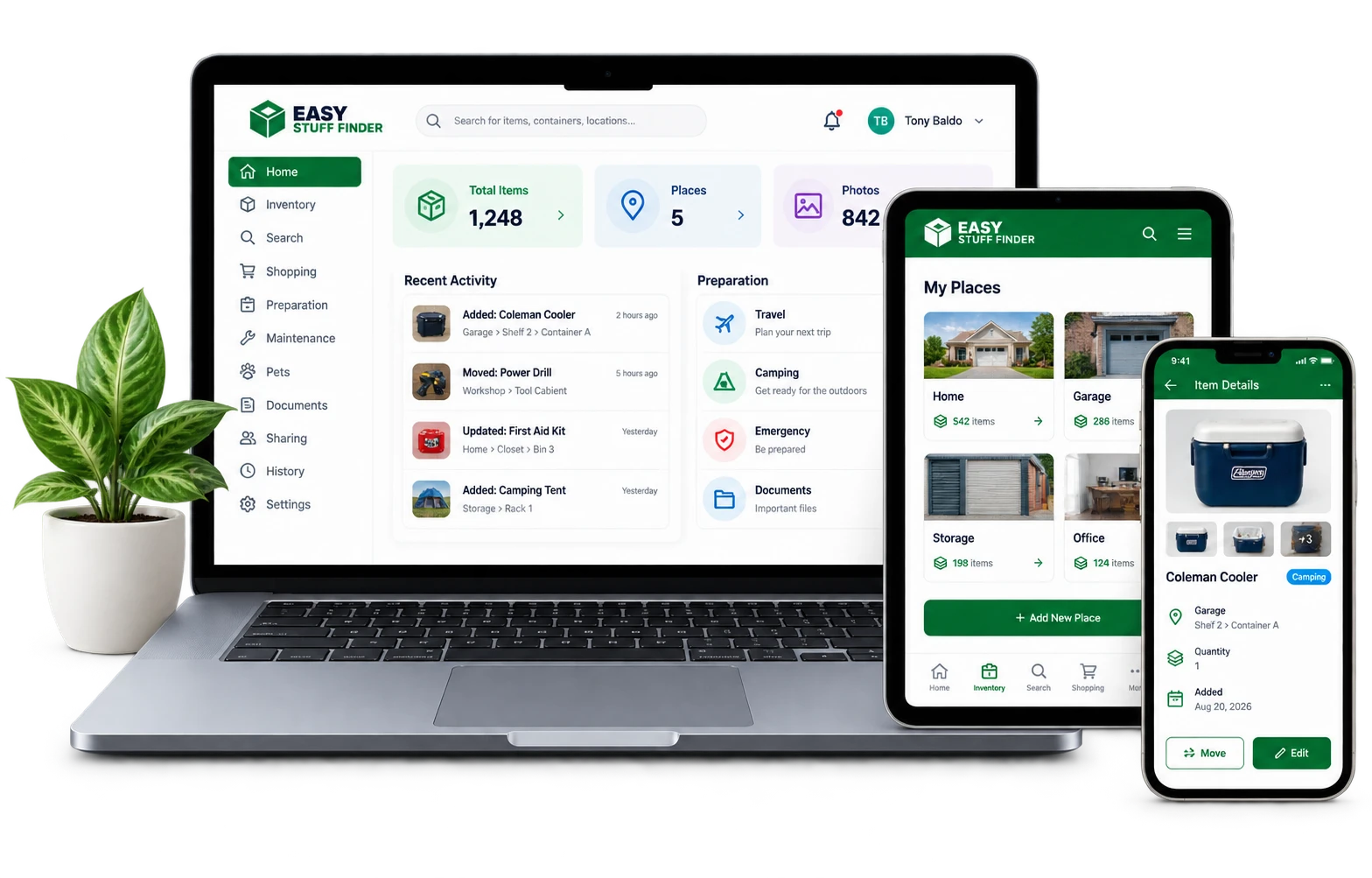

Upgrade with confidence.
If you decide you need more than the Free plan, your initial paid subscription is protected by our 30-Day Money-Back Guarantee. Try the paid features and decide whether they're right for you.